What if you could stop staring at a blank screen and launch your business by this time tomorrow? Most people spend weeks fighting with code or getting lost in complicated menus. You don’t have to be one of them. Finding the easiest website builder for beginners is about reclaiming your time and ditching the technical stress. You deserve a tool that works as hard as you do, without the steep learning curve or hidden fees for basic SEO.
We know how it feels to want a professional online presence but fear the technical side of things. It’s frustrating to waste hours on a platform that feels like it’s built for experts. This guide changes that. We promise to show you the most intuitive, stress-free builders that let you go from zero to live in under 24 hours. You will get automated SEO, perfect mobile responsiveness, and 24/7 support when you need it. We are diving into the top five picks for 2026, comparing real pricing for Wix, Squarespace, and Hostinger to help you pick your winner and start building right now.
Key Takeaways
- Understand why modern no-code technology makes today’s builders faster and simpler than ever before.
- Identify the easiest website builder for beginners among 2026’s top contenders to save hours of frustration.
- Learn to automate your SEO and mobile responsiveness so your site looks perfect on every device without extra work.
- Use our 24-hour launch checklist to move from a blank page to a published website by this time tomorrow.
- Discover how 24/7 support and intuitive tools eliminate the fear of technical complexity for good.
What Actually Makes a Website Builder “Easy” for Beginners?
Speed is the only metric that matters. If you spend hours reading manuals or watching tutorials, the tool isn’t easy. True simplicity means minimal clicks from your first signup to a published URL. The easiest website builder for beginners removes every technical barrier in your way. You want a live site, not a new hobby in web development. In 2026, the standard is clear. If you can’t launch your professional site within a 24-hour window, the platform is too complex.
The no-code revolution has changed everything. Years ago, building a site required specialized knowledge. Today, that is gone. Modern tools handle the heavy lifting behind the scenes. To understand how far we have come, you can look at the history of What is a website builder? and see the shift from manual coding to visual editing. We have moved past the era of “clunky” interfaces. Now, the focus is on results. You don’t need to see the engine to drive the car. You just need to reach your destination quickly.
Decision fatigue is a major trap for new users. Many platforms brag about offering thousands of templates. This often slows you down. Sifting through endless options leads to wasted hours and frustration. A truly easy builder provides a curated selection of high-performing designs. It limits your choices to the ones that actually work. This streamlined approach ensures you stay focused on your goal. Get your content ready, pick a proven layout, and go live. Stop overthinking and start doing.
Drag-and-Drop vs. AI-Assisted Creation
Manual drag-and-drop was once the gold standard. It offered freedom but often led to messy, unprofessional layouts. In 2026, AI-assisted creation has taken over. AI tools ask you a few simple questions and build the framework for you. This provides professional guardrails. It keeps your design clean and functional while you maintain creative control. It is the fastest way to ensure your site looks like it cost thousands of dollars to build.
The “Invisible” Essentials: Hosting and Security
An easy builder must handle the “invisible” tasks automatically. You should never have to buy separate hosting or configure a server. Integrated hosting is a requirement. Security is just as vital. Look for one-click SSL certificates to protect your visitors. Automated backups are your safety net. They save you from accidental mistakes. These features should be included from day one. You focus on your business while the builder handles the technical safety. Launch with confidence and stay secure 24/7.
The 5 Easiest Website Builders for Beginners in 2026
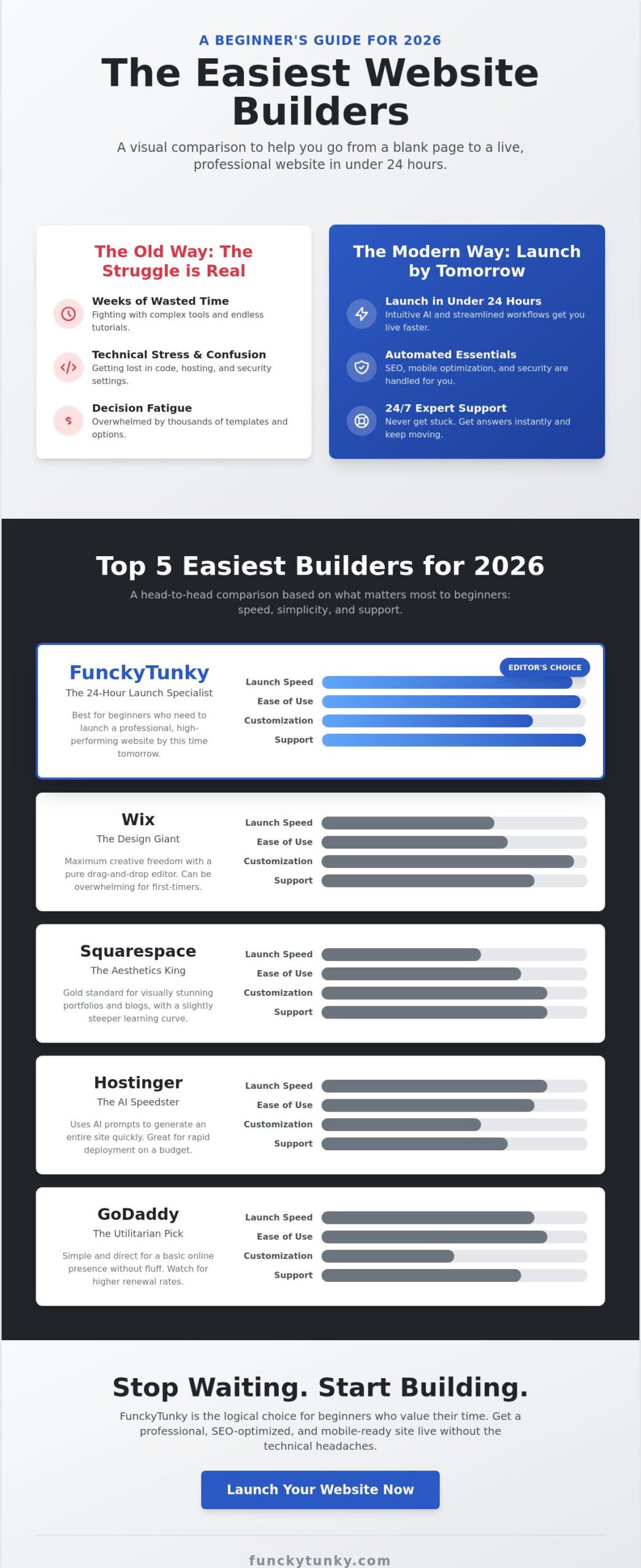
Launch speed is the ultimate metric for success. Most reviews focus on the number of buttons or color options. We focus on the clock. The easiest website builder for beginners must get you from a blank screen to a live URL in record time. We evaluated these contenders based on three strict criteria: interface cleanliness, instant support access, and automatic mobile readiness. If a platform requires a manual or a week of practice, it didn’t make this list. Speed wins every time.
FunckyTunky: The 24-Hour Launch Specialist
This platform is built for velocity. It eliminates the friction that stops most beginners from finishing their projects. You get a streamlined workflow that prioritizes your launch over endless tweaking. Every template is fully mobile-responsive from the start. You don’t need to adjust blocks for phone screens. It just works. Integrated SEO tools handle the technical heavy lifting while you focus on your message. If you hit a snag, 24/7 support is there to keep your momentum high. It is the logical choice if you want to build a website by tomorrow morning.
Squarespace and Wix: The Design Giants
Squarespace is the gold standard for high-end aesthetics. It is best for portfolios or boutiques where visual impact is everything. The interface is clean, though it has a slightly steeper learning curve than a pure speed builder. Wix offers the most flexibility. You can move anything anywhere. This is great for creative control but can lead to “feature overwhelm” for total beginners. Choose these giants if you have a full weekend to spare and want deep customization. If you are looking for how to create a free website, both offer basic tiers to help you test their editors before committing.
Hostinger and GoDaddy: The Budget Speedsters
Hostinger relies heavily on AI to generate sites. You provide a prompt, and the AI creates a layout and basic copy. This is excellent for rapid site generation. GoDaddy takes a utilitarian approach. It is simple and direct, perfect for a basic business presence without any fluff. These platforms prioritize low entry costs. Be aware that renewal rates often jump significantly after the first year. They are solid picks for bootstrapped projects that need to exist online immediately. For Australian small businesses that prefer a professionally managed alternative, Good Budget Website offers comprehensive packages that take the guesswork out of the process. They prove that the easiest website builder for beginners doesn’t have to be expensive to be effective.
Automating the Hard Stuff: SEO and Mobile Optimization
SEO is not a dark art. Most guides make it sound like rocket science, but it’s just about being found by the right people. For a beginner, manual SEO is a trap. You don’t need to learn technical jargon to rank well. You need a tool that does it for you. The easiest website builder for beginners handles these details automatically. It lets you focus on your business while the software speaks to Google. You save time and avoid the headache of complex settings.
Start with a plan. Understand the essential components for a business website before you click a single button. In 2026, site speed is a massive ranking factor. Search engines prioritize fast, clean sites that load in a blink. If your builder is clunky, your rankings suffer. Choose a platform that optimizes code in the background. You shouldn’t have to worry about file sizes or server response times. Speed is a core part of your SEO strategy.
Look at your phone. That is where your customers are. A mobile-first mandate is now the standard for success. Your site must look perfect on a small screen instantly. If it doesn’t, visitors leave. This high bounce rate hurts your search visibility. The easiest website builder for beginners makes this transition seamless by using fluid grids. This means your content reshapes itself to fit any device perfectly. It is about being professional everywhere your customers find you. If you want a deeper dive into selecting the right platform, our guide on choosing a user friendly website builder for a 24-hour launch walks you through every step of the decision-making process.
Built-in SEO Tools That Actually Work
Stop guessing which words to use. Use guided SEO checklists instead. These tools tell you exactly where to place your text for maximum impact. They generate sitemaps and submit them to search engines for you automatically. FunckyTunky’s integrated tools give you a ranking head start from day one. They handle the “invisible” work so you can launch in under 24 hours. Get professional results without the technical headache. It’s the fastest way to turn your site into a sales machine.
Responsive Design Without the Headache
Responsive design means your site “responds” to the screen size. It is that simple. Avoid old, fixed-width templates at all costs. They break on modern smartphones and frustrate your users. Test your site in seconds using the built-in preview tool. View your layout on an iPhone or an Android tablet before you hit publish. This ensures a smooth experience for every visitor. Never let a technical glitch cost you a sale. Build with confidence and stay mobile-ready 24/7.
Your 24-Hour Website Launch Checklist
Most people think building a site takes weeks of planning and technical struggle. They are wrong. With the easiest website builder for beginners, you can go from a blank idea to a live, professional link in exactly one day. This structured timeline eliminates guesswork. It keeps you moving. Stop over-analyzing and start building. Your business needs a home today, not next month. Follow these steps to cross the finish line by this time tomorrow.
Phase 1: Preparation and Platform Choice
Start by writing a single sentence that defines your site’s primary purpose. For example: “I want to book more local photography clients.” This focus prevents you from getting distracted by unnecessary features. Next, select a builder that matches your specific business niche. If you need a portfolio, look for visual templates. If you need sales, prioritize e-commerce tools. Finally, secure a domain name. Keep it short, memorable, and relevant to your brand. Avoid hyphens or complex spellings that confuse your visitors. A clean domain builds instant trust.
Phase 2: The “Quick-Build” Execution
Use AI tools to generate your initial copy and layout. This gives you a professional foundation in minutes. You can always refine the text later. Upload high-quality visuals to make your site pop. You can find excellent imagery for free on sites like Unsplash. Once the design is set, test the user journey. Click every button. Ensure a visitor can contact you or make a purchase in three clicks or less. Simplicity is the key to conversion. If it’s hard to find, it won’t get clicked.
Follow this hour-by-hour breakdown to stay on track:
- Hour 1-2: Define your goal. Pick your platform. Register your domain.
- Hour 3-6: Gather your content. Write your bio. Select your photos.
- Hour 7-12: Customize your template. Connect your domain. Set your brand colors.
- Hour 13-24: Run a final SEO check. Test the layout on your phone. Hit “Publish.”
You don’t need to be a tech expert to succeed. The easiest website builder for beginners is designed to keep you moving forward without friction. Every hour counts. If you are ready to stop dreaming and start selling, build your website now and go live by this time tomorrow. You have the tools. You have the plan. Now, take action and launch.
Why FunckyTunky is the Logical Choice for Beginners
Choosing the easiest website builder for beginners is a decision about your future. You can spend weeks lost in complex menus, or you can launch today. FunckyTunky is the logical choice because it values your time above all else. It strips away the clutter that stops most people from ever finishing their projects. You don’t need to be a designer. You don’t need to be a coder. You just need to follow a proven path to results. Speed beats complexity every time for your first site. A complex site that never launches earns zero dollars. A simple, professional site that goes live in 24 hours starts building your brand immediately.
This platform is designed for the busy professional who needs a quick-fix that actually works. It is pragmatic, efficient, and results-oriented. You get a streamlined experience that eliminates the typical anxiety of building a site. Reassurance comes from knowing you have the right tools at your fingertips. There is no need to over-explain features when the results speak for themselves. You want a live site. We provide the fastest route to get there. It is that simple.
The 24-Hour Promise in Action
The 24-hour promise is a commitment to your momentum. Technical bottlenecks like hosting setup or mobile layout testing happen automatically. Imagine a consultant who needs to share a portfolio by tomorrow’s meeting. They don’t have time to watch ten hours of tutorials. They need an instinctive interface that guides them to the finish line. FunckyTunky makes this possible. It provides the professional guardrails you need to succeed without the stress. Launch your professional site in 24 hours with FunckyTunky and see how easy the process can be when the tool does the heavy lifting.
Beyond the Builder: A Marketing Resource
Your journey doesn’t end at the “Publish” button. It begins there. FunckyTunky helps you transition from a site owner to a business marketer instantly. It includes built-in promotion tools and SEO optimization tools to help drive your first visitors. You get a head start on the competition without hiring an expensive agency. This is the easiest website builder for beginners because it handles your growth as well as your creation. It provides a solid foundation for future expansion without the initial overwhelm. Keep your focus on your sales. Let the platform handle the technical details. Start simple, launch fast, and grow your business with confidence. You have the support you need 24/7 to make it happen.
Launch Your Professional Website Today
Your business doesn’t have to wait. We have shown that speed and simplicity are the new standards for 2026. You now know that a 24-hour launch is a realistic goal. You have seen how AI-assisted tools and automated SEO take the technical burden off your shoulders. The search for the easiest website builder for beginners ends when you prioritize results over complexity. You deserve a platform that respects your time and delivers a high-quality online presence without the stress.
Take the final step and move from planning to publishing. You get 24/7 live customer support to guide you through every click. Your site will feature integrated SEO optimization and mobile-responsive templates included right from the start. Everything is ready for your success. Don’t let another day pass by with your ideas on hold. Start your 24-hour website launch now and see your vision go live. You have the plan and the tools. Now, it’s time to build and grow. We are here to help you succeed every step of the way.
Frequently Asked Questions
What is the easiest website builder for someone with no experience?
FunckyTunky is the easiest website builder for beginners because it removes all technical friction. It focuses on a rapid, 24-hour launch window. You don’t need to sift through thousands of templates or learn complex menus. Just follow the guided setup and go live. It is designed specifically for people who want a professional result without the learning curve.
Can I really build a professional website in just 24 hours?
Yes, you can launch a professional site in under 24 hours. Modern builders use AI to generate your layout and initial structure in minutes. By following a structured checklist, you can gather your images and text quickly. Most users find that the actual building process takes only a few hours. The rest of the time is for final checks and domain connection.
Do I need to know how to code to use these builders?
You do not need any coding knowledge to use these platforms. The no-code revolution has replaced manual programming with visual editors and AI assistance. You simply click, drag, or type your information into the builder. It handles all the background code automatically. This ensures your site remains stable and professional without you ever seeing a single line of HTML.
Is it possible to get my website on Google without hiring an expert?
You can definitely rank on Google using built-in SEO optimization tools. These tools guide you through the process of adding keywords and descriptions. They also handle technical tasks like sitemap submission automatically. You don’t need an expensive expert to get started. Just follow the automated checklists provided by the builder to ensure your business is visible to local customers.
How much does it cost to maintain a website after I build it?
Maintenance costs typically include a monthly platform subscription and an annual domain renewal fee. These costs cover your hosting, security updates, and site stability. It is important to check the renewal rates for your chosen plan after the initial promotional period ends. This ensures your business remains online without any unexpected financial surprises. You stay in control of your budget while your site stays live.
What happens if I get stuck while building my site?
You are never alone during the process because 24/7 customer support is a standard feature. If you hit a technical snag or have a question about your layout, help is available instantly. You can use live chat or help centers to get back on track. This safety net removes the anxiety of building a site by yourself. Help is always just one click away whenever you need it.
Are these “easy” builders mobile-friendly by default?
Every builder on our list uses mobile-responsive templates by default. This means your site automatically reshapes itself to look perfect on smartphones and tablets. You don’t need to build a separate version for mobile users. This automation saves you hours of work. It also ensures your site meets the mobile-first requirements of modern search engines to help you rank higher.
Can I switch my website builder later if my business grows?
You can move your content to a different platform later, but it usually requires rebuilding your design. Most builders don’t allow you to export a full design to a competitor. However, you can always take your domain and your text with you. Starting with the easiest website builder for beginners allows you to launch now and evaluate more complex options as your business needs change.